PlantPulse AI Platform
- Make the chatbot answer from your own documents — get your first answer from a single document
- Question examples — what you can ask
- One-line install → Change the initial password
- Work process — keeping it useful after rollout
"All the data in the plant, for everyone, in a single sentence of plain language"
Online manual: https://kopens.gitbook.io/plantpulse-ai
PlantPulse AI Platform is an industrial AI copilot platform that brings together real-time shop-floor data, AI analytics, and knowledge management.
When a plant operator asks a question in plain language, the AI automatically queries live sensor data, runs anomaly detection and predictive analytics, and searches technical documents — supporting immediate, accurate decisions.
Copilot — the field judgment app
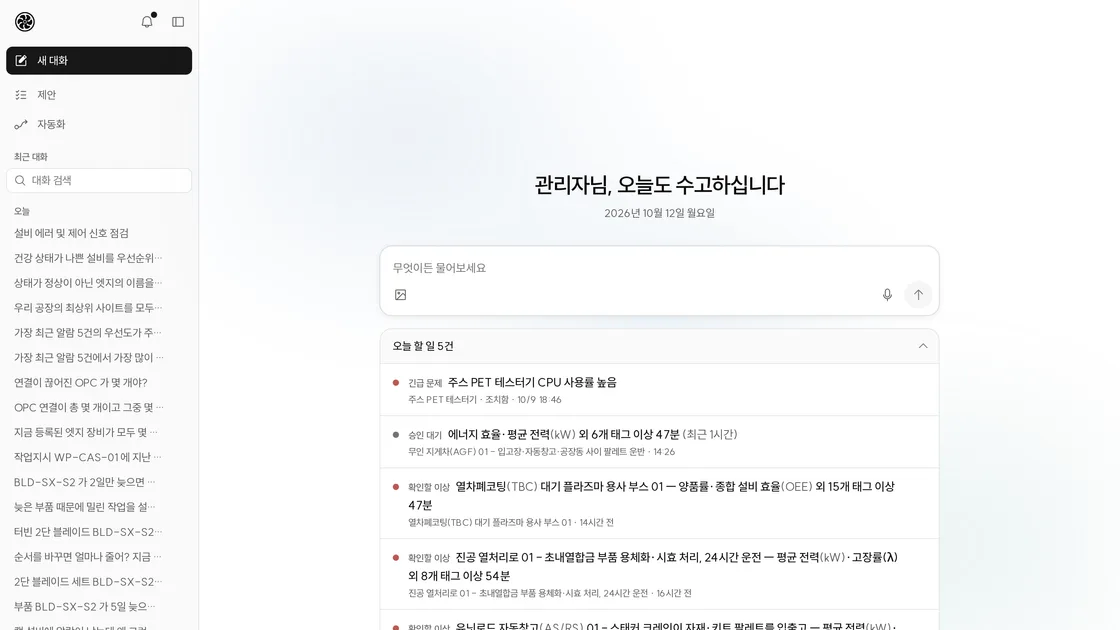
Copilot, the app people actually use, is a field judgment app that finds plant problems and proposes actions with supporting evidence, lets people approve and close them, asks when it does not know, and hands repetitive work over to automation. It is the entry point that operators, line leaders, maintenance staff, and plant managers open their day with, and it has three uses: Ask · Proposals · Automation. The sidebar lists, from the top, New chat · Proposals · Automation — there is no separate «Ask» entry; New chat and the screen that opens first are Ask.
| Use | What it does | Details |
|---|---|---|
| Ask | Ask with text, photos, or voice and get answers with evidence. This is the screen that opens first, and anything needing attention is folded into a single «Today's tasks» line (tap to expand) | AI Chat |
| Proposals | Handles the tasks the AI has found (planned) and anomalies to check · incidents (unplanned) from intake → approval → action → result → recurrence verification, all in one detail view | Proposals |
| Automation | Hand off "check this for me every morning" in a single sentence. Results come back as proposal cards and reports, and also arrive via in-app notification, company email, or messenger. Watch items (formerly «Watch») are created here too | Automation |
The full set of screens is in the Copilot screen map, and how to open it is in Opening Copilot.
It is also worth being clear about what Copilot is not.
| Not this | Why |
|---|---|
| MES | The system of record for execution and production results is the customer's system. Copilot reads from it; what it writes is only a draft approved by a person |
| ERP | The system of record for orders, materials, and costs is likewise the customer's system. Again, only approved drafts are written out |
| BI dashboard | The goal is the cause behind the numbers and the next action, not the numbers themselves. If you want a number, ask for it in Ask |
| Chatbot | Chat is just one entry point. A problem that is found is raised as a proposal and carried through approval, action, result, and recurrence verification |
| Operator execution terminal | It does not report the start or completion of MES work orders — «result records» in Proposals are the results of action proposals and incidents |
There are two principles.
- Automation instead of features — when something new needs watching, don't wait for a screen or menu to be added; first see whether automation can solve it. Anything you check repeatedly can be handed off in a single sentence.
- Optional integration — Digital Thread, MES, ERP, PLM, and QM connections are optional. The screens are complete without them, and with them you gain capability only — more tools for Ask and Automation to use, and evidence links attached to proposals. There are no integration-only screens, cards, or menus.
The AI goes as far as explanation, summary, and drafts; writes are approved by a person. The UI is monochrome, and color is used only for status dots (red = urgent · orange = caution · green = normal).
Agent · Agent Builder is now called Automation. Each case opened by an alarm or anomaly signal is an incident (incident in code and the API). The old menus «Today · Action proposals · Anomaly diagnosis · Resolution · Reports» have been consolidated into the Ask home screen and Proposals. Watch has been removed — create watch items with Automation (old screen URLs are not carried over to the new locations) → Copilot screen map — old URLs
Key figures
| Item | Figure |
|---|---|
| MCP servers providing tools to chat | 6 |
| Platform integrated MCP data tools (including ontology) | 22 |
| TimeSeries-Insight analysis tools | 39 |
| RAG search tools | 2 |
| Digital Thread tools | 3 |
| Ontology node types | 14 |
Platform components
| Component | Role |
|---|---|
| AI Chat Web | User interface — Copilot (Ask · Proposals · Automation). Tool calls in Ask are made by the built-in agent |
| Integrated MCP | Real-time plant data gateway (Platform server-web /api/v5/mcp, including ontology) |
| Ontology | Plant knowledge graph — equipment relationship/structure analysis (included in the integrated MCP) |
| TimeSeries-Insight | AI anomaly detection + prediction + feature store (39 analysis tools) |
| RAG | LightRAG-based technical document search — instant reference to manuals, SOPs, and regulations |
| Digital Thread | Connectors to external systems (MES·SCM·ERP·PLM·QM) and a mirror of the plant graph — equipment timelines and connection tracing |
| AURA | Industry-specific LLM — a manufacturing-domain fine-tuned model |
Benefits
| Area | Before | After (PlantPulse AI) |
|---|---|---|
| Grasping current status | SCADA + Excel + manuals, 30 min~1 hr | Plain-language question, 10 seconds |
| Anomaly detection | Rule-based alarms (reactive) | AI early detection + cause estimation |
| Maintenance approach | Preventive maintenance (interval-based) | Predictive maintenance (condition-based) |
| Document search | Manual browsing of the file server | AI hybrid search, instantly |
| AI cost | Pay-as-you-go cloud API | On-premises fixed cost, unlimited |
| Data security | Sent to an external cloud | Kept entirely on-premises in-house |
Technology stack
| Layer | Technology |
|---|---|
| AI models | AURA LLM, IBM Granite TSPulse, TinyTimeMixer TTM |
| AI frameworks | MCP (Model Context Protocol), LiteLLM, LightRAG |
| Backend | Java 21 / Spring Boot 3.4, Python / FastAPI |
| Graph DB | Neo4j |
| Vector DB | Qdrant |
| Relational DB | PostgreSQL 18 |
| Time series DB | Apache Cassandra |
| Cache | Valkey (Redis-compatible) |
| Object storage | RustFS (S3-compatible) |
| GPU | NVIDIA DGX Spark compatible (runs on modest hardware) |
| Deployment | On-premises / edge / cloud |
Target industries
| Industry | Main use scenarios |
|---|---|
| Food & beverage manufacturing | Production line OEE management, quality monitoring, energy optimization |
| Chemicals / petrochemicals | Early detection of process anomalies, safety compliance, equipment health management |
| Automotive parts | Predictive maintenance, work order quality tracing, line balancing |
| Semiconductor / electronics | Detection of subtle anomalies, yield prediction, cleanroom environment monitoring |
| Steel / metals | High-temperature equipment monitoring, energy management, maintenance interval optimization |