Digital Thread
The Digital Thread is a service that strings together what happens in the plant chronologically, and by what connects to what. It joins the Platform's equipment/tag master and events with the work orders, parts, people, engineering changes, nonconformances, maintenance, and permits served up by external systems such as MES, ERP, PLM, quality, maintenance, and safety — all in one graph. As of 2026.10 it is included by default in the AI stack — there is no switch to turn on.
| Who | Where | What |
|---|---|---|
| Operator (administrator) | AI Admin Console → Digital Thread in the rail | Attach external system connectors, bind fields, check that the mirror is running, and see what is attached to readiness decisions |
| Field user | Copilot Ask (/chat) — thread_ tools | Ask "What work is on today?", "What happened at the charger this morning?", "What is attached upstream and downstream of this equipment?" and get answers. The copilot has no dedicated Digital Thread screen → Digital Thread — What You Gain When It Is Connected |
| Automation · proposals | The same thread_ tools · action tools | Automation checks the same things at set times, and approving in the proposal detail creates a draft in the external system |
What it is made of
| Component | What it does |
|---|---|
plantpulse-digital-thread-api (internal 7140) | Connector registry · conformance test · binding sync · mirror projection · timeline/connection queries · work readiness decisions · chat tools |
plantpulse-digital-thread-neo4j (not published) | Plant graph mirror store. Dedicated to this service and kept separate from LightRAG's Neo4j |
Schema dt in PostgreSQL pi | Connector registry · bindings · identity declarations · action records → Database Model |
Neither container exposes a host port. The admin console and the copilot call them inside the compose network → Service Port Map
The mirror contains only the IDs and connections of events and objects, not their contents. It is a copy that can be rebuilt at any time from the sources (Platform master · events, external systems). Values such as names and expiry dates in external systems are read from the connector at query time and not stored.
Integration map — attaching connectors
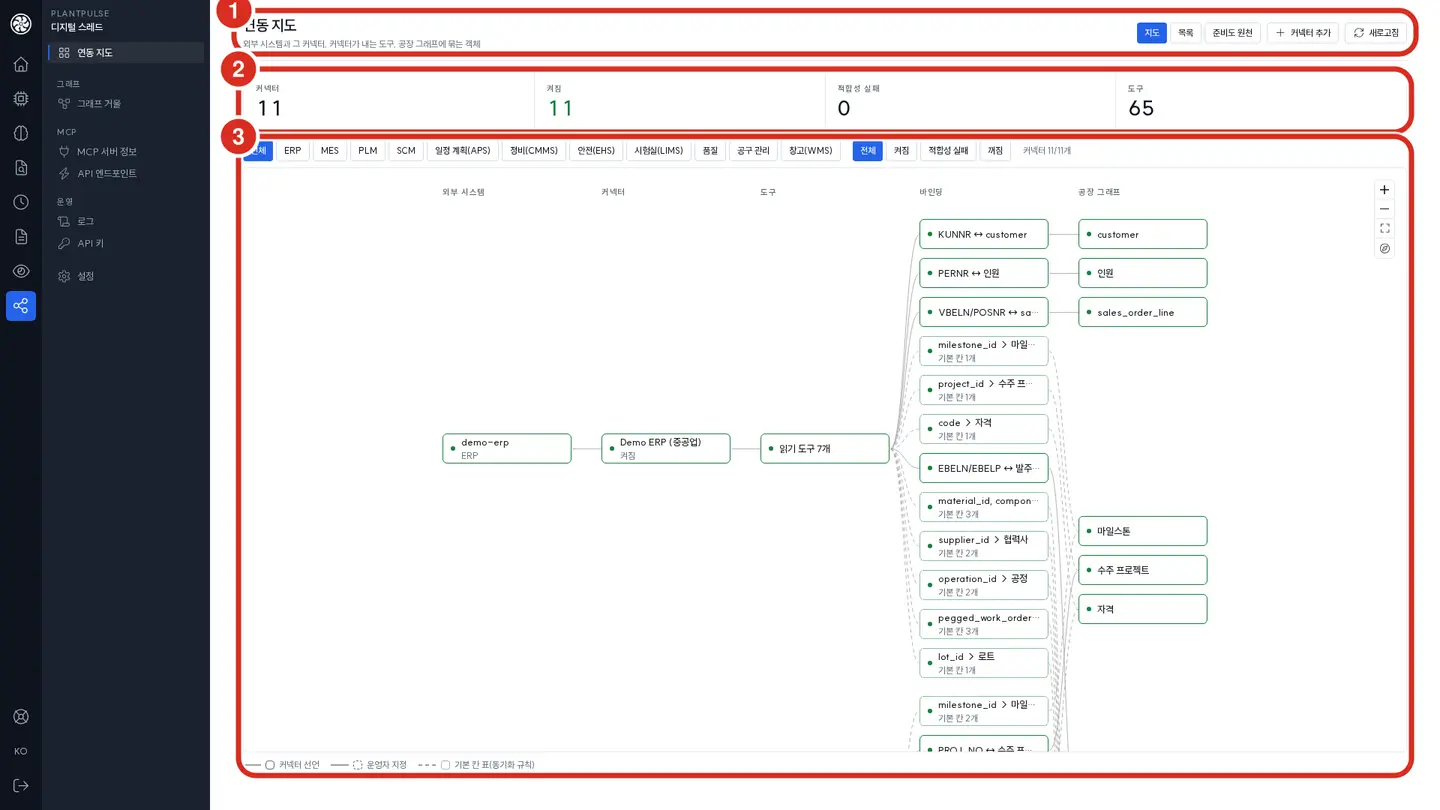
| No. | Location | What it does |
|---|---|---|
| ① | Screen header | View buttons Map / List / Readiness sources (List shows the same content as a table; Readiness sources is below), Add connector (the four steps below), refresh |
| ② | Summary cards | Number of registered connectors · number enabled · number of conformance failures · number of tools served by connectors. If conformance failures is not 0, start with that connector |
| ③ | Map | Links external system → connector → tool → binding → plant graph from left to right. Clicking a node opens its settings, per-check conformance results, and recent action calls in the side panel, and the map highlights only that node's chain |
There are eleven families, so the map is wide. Narrow it with Family and Status in the filter row above the map, and navigate by dragging, scrolling, and Ctrl+scroll (zoom) → AI Admin Console — Integration Map
Read the colors and lines on the map as follows.
| Indicator | Meaning |
|---|---|
| Green | Enabled — passed the conformance test |
| Red | Conformance failure |
| Gray | Disabled |
| Solid binding line | Declared by the connector |
| Dotted binding line | Specified by the operator, or the service's default field table (fields the sync always carries) |
| 🔒 Action tool | A tool that creates a draft or request in an external system — the console does not call these (see "Safeguards" below) |
Registering a connector — four steps
Clicking Add connector opens the side panel.
- External system — choose the family (table below), the system name, and the connector name.
- Endpoint and credentials — enter the connector's MCP endpoint and the auth header and value, then click Register and discover. The service reads the tool list and sites from the connector and shows "Discovered N tools at site …". The connector is created disabled.
- Conformance — run the conformance test. Each check reports pass or fail, and a failed check states what was violated.
- Enable — 🔴 You can only enable it after it passes the conformance test. Once enabled, that connector's tools are served to that site.
If you change the endpoint or credentials in Edit and save, the connector is disabled and its conformance results are cleared. Start again from step 3. The same applies when the connector's tool list changes (tool discovery).
The screen only shows "Set / Not set". If you leave the field blank when editing, the stored value remains. Values are encrypted with PI_DT_SECRET_KEY before storage — if you lose this key, stored credentials cannot be decrypted and must be re-entered for each connector → Changing Passwords and API Keys
What the conformance test measures
It actually calls the connector to see whether it responds according to spec. Typical checks are as follows.
| Group | What it measures |
|---|---|
| Discovery | Whether capabilities conform to the schema, whether tool names exist in the spec of the declared version, and whether all required tools of the family are present |
| Declaration | Whether read tools carry the read-only marker, and whether input schemas match the spec |
| Output | Whether sample call results conform to the spec schema — emitting fields from a newer version than the declared one also fails |
| Time · paging · limits | Time formats, absence of duplicates or gaps when paging to the end, and rejection of overly wide ranges or unconditional listings |
| Errors · size | Whether not_found is returned for a nonexistent ID, and whether responses stay within 16,000 characters |
| Events · bindings | Event envelope shape, whether an event's target resolves through a binding, and whether reading the same event twice yields the same ID |
| Latency | Whether p95 of required read tools is under 2 seconds |
Checks run against samples from the «last 7 days ~ next 7 days» window. A window with no data at all cannot be measured for schema, so test with a connector that has real data.
Supported specs and families
The registration screen offers eleven families following nine spec lines. Families without a spec cannot be registered. The tools each family must serve, where they are used, and the caveats are listed per family in Digital Thread Connectors.
| Family (screen name) | Spec · minimum version | What it carries (keys only) |
|---|---|---|
mes (MES) | mes-mcp/0.7 | Equipment · work orders · operations · milestones · order projects · production lots · genealogy · manufacturing BOM |
scm (SCM) | mes-mcp/0.7 | Suppliers · purchases · supply lines · shipments · receipts · shortages · supply capacity |
sched (Scheduling (APS)) | mes-mcp/0.7 | Operation schedules of the published plan · resource calendars · scenarios |
erp (ERP) | erp-mcp/0.4 | People (pseudonymous IDs) · qualifications · assignments, material purchase orders · receipts · customer orders, manufacturing BOM |
plm (PLM) | plm-mcp/0.2 | Engineering change orders · engineering BOM · document metadata |
qm (Quality) | qm-mcp/0.2 | Inspection lots · nonconformances (NCR) |
cmms (Maintenance (CMMS)) | cmms-mcp/0.2 | Maintenance work orders · preventive maintenance windows |
tool (Tool management) | tool-mcp/0.2 | Tool, jig, and gauge registers and declared capabilities (issue · calibration · life · tools per job) |
wms (Warehouse (WMS)) | wms-mcp/0.2 | Inventory · movements (not carried in the mirror; read on request) |
lims (Laboratory (LIMS)) | lims-mcp/0.2 | Samples · test results |
ehs (Safety (EHS)) | ehs-mcp/0.3 | Work permits · isolation (LOTO) · incident references · inspections · risk assessments · role qualifications |
- 🔴 A connector declaring a version lower than the minimum is not used (from 2026.10 re-release (2026-10-20)) — the sync rejects it and decisions mark it as «not attached». To raise the version, see Raising the version.
- If an already attached connector starts declaring a new version, it is disabled at tool discovery — run the conformance test and enable again for that connector only.
- Action tools (🔒 — tools that create drafts or requests) exist only in the
mes-mcplines — MES hold requests · maintenance requests · work order drafts, SCM expedite and supplier inquiry drafts, and scheduling scenario drafts. The other eight specs are read-only. - These specs are defined as a common denominator, not for a specific product. Put a connector that follows the spec in front of the system you use and attach it.
Commercial product adapters — pre-validation stage
The SAP S/4HANA (ERP · maintenance), IBM Maximo (maintenance), Siemens Teamcenter (PLM), and Dassault 3DEXPERIENCE (PLM) adapters are at the stage of having passed the conformance test against a mock server, and have not been validated against the actual products → Commercial product adapters
When one site has several connectors of the same family
A site can have several connectors of the same family (for example, a different MES per line). Each family has one primary, and the first connector registered becomes the primary.
- To hand over the primary role, designate another connector as primary — the existing primary steps down automatically. The primary cannot be left empty.
- If two connectors serve the same tool name, the one attached later is rejected. Remove the tool on the connector side.
- When a copilot proposal card sends an action and several connectors of the same family exist, it goes to the primary.
External links — open in the source system
When you click a thread node (PO line · work order · part number …) in the evidence panel of copilot Ask, a link such as "Open in SAP" to that record's screen in the source system is attached → Digital Thread — Answer evidence. This link appears only when an administrator has put link templates on the connector. Without templates there is no link (the installation default).
You enter them in Integration map › connector node › External links in the side panel.
| Field | What goes in |
|---|---|
| Base URL | The root of the source system's screens (e.g. https://s4.example.com). https only. Do not include user:pass@ · a query · a fragment |
| Button label | The text shown on screen, up to 60 characters (e.g. "Open in SAP"). If empty, the connector name becomes the button text as-is |
| Allow http:// (in-house demo only) | Turn on only for an in-house demo system on plain http. Production systems must be https |
| Templates by object kind | One URL template per kind (po_line · work_order · part · ncr …). Add more with Add template. At least one is required |
| Sample key for the preview | Enter a sample key to preview the address the template builds (for reference) |
There are only three placeholders.
| Placeholder | What goes in |
|---|---|
{base} | The base URL (without a trailing /) |
{key} | The whole object key (URL-encoded — / becomes %2F too) |
{key.1} ~ {key.9} | The N-th part of the key split on /. For using the PO number and line number of PO line 4500001/10 separately |
po_line   {base}/sap/bc/ui2/flp#PurchaseOrder-display?PurchaseOrder={key.1}&PurchaseOrderItem={key.2}
customer  {base}/sap/bc/ui2/flp#Customer-display?Customer={key}
- When you click Save links, the Digital Thread checks the templates. If a template has no
{key}·{key.N}, has an unknown placeholder · kind · whitespace, or the resulting address leaves the base URL's host, it rejects it and shows the reason. 🔴 The final verdict is the check at save time; the on-screen preview is for reference only. - Remove links removes that connector's templates. Adding or removing templates leaves conformance results and enabled state unchanged.
- Pasting a links setting (
{"base_url": …, "templates": …}) or a proposal a demo system produced ({"links": …}) into Fill from JSON fills the form. - If several connectors have templates for the same kind, among the enabled connectors at the same site as the node, the system-of-record family for that kind (ERP for PO lines · customer orders, MES for work orders · operations, PLM for part numbers · documents · engineering changes, QM for nonconformances · inspections, CMMS for maintenance orders) is used first, then the primary. If the same number exists at several sites and the addresses diverge, no link is produced.
- The copilot shows the destination host next to the button, and out-of-scope nodes have no link. The permissions of the person who opened the link are judged again by the source system.
- Changed templates take effect immediately. However, evidence cards of answers already saved keep the link from when they answered; the link under current values in the source system, opened by clicking the node, is the one built from the current template.
Binding fields — drag and drop
Bind fields the sync does not carry by default to objects in the plant graph, or change or disable the type of a field declared by the connector.
- Click the read tools group on the map. The side panel expands a field list per tool.
- Drag and drop the field onto a type (equipment · work order · part …) in the plant graph column on the right of the map (or click the field, then click the type).
- Click Bind in the confirmation box of the side panel. If you drop a declared field onto a different type, «This overwrites the declared type» is also shown.
- To disable, use 🚫; to delete, use the trash icon on the field row or the dotted node on the map.
- Operator bindings override connector declarations.
- Changes take effect from the next sync. If you do not want to wait for the periodic sync (below), click Sync now in the side panel — it reports object and connection counts. Only enabled connectors can be synced.
- A record's own ID field cannot be changed.
- Who changed what and when is recorded in the binding change history and the admin console audit log (
thread.write).
Manufacturing BOM (M-BOM)
The engineering BOM (PLM's plm_get_bom) is «what it is made of», while the manufacturing BOM is «how it is actually built in the plant» — phantoms, semi-finished items, alternate materials, and which operation consumes it. Depending on where the system of record is, one of the two connectors serves it.
| M-BOM system of record | Connector | Tool |
|---|---|---|
| ERP | erp declares erp-mcp/0.2 | erp_get_mbom |
| MES · MPM | mes declares mes-mcp/0.6 | mes_get_mbom |
Both tools produce the same shape. If both are enabled, the ERP side is read first.
- Recovery plans become more accurate. With an M-BOM, the service can tell which operation a part number touched by an engineering change or nonconformance blocks, using the consuming operation. Without it, it assumes «blocking at work order level» and says so in the «What was not considered» part of the answer.
- Three-way BOM comparison — compares the engineering BOM, manufacturing BOM, and drawing parts list and reports only missing child part numbers, quantities, units, and version lags. It changes nothing. There is no screen; view it through the service API (
/api/v1/bom/reconcile).
Material purchase orders and customer orders — the thread joined by PO
From 2026.10 re-release 3, the thread joins both ends via orders.
자재 PO 줄 ─(걸림)→ 작업지시 ─(속함)→ 마일스톤 · 프로젝트 ─(이행)→ 고객 주문 줄 ─(주문자)→ 고객
Material PO lines — merging ERP and SCM into one. The system of record for POs is ERP (erp_list_purchase_orders of erp-mcp/0.3), while SCM knows the delivery date confirmed by the supplier. When both are attached, the same po_id · po_line are merged into one line.
| Field | Which source's value is used |
|---|---|
| Delivery date (promised · confirmed) | SCM if a supplier confirmation (confirmed_date) exists in SCM, otherwise ERP |
| Status · open quantity and the rest | ERP (system of record) |
- 🔴 If the two sources disagree, one is not silently chosen. The chosen value and the rule are reported together in
conflicts[], and carried through into recovery plan answers. - Lines present in only one source keep that source's values as-is.
- Even without SCM, the material items of readiness and the recovery plan work from ERP alone. In that case it treats «open PO lines tied to a work order = materials that work order is waiting for», and since ERP POs say nothing about inventory, inventory is unknown — this assumption is written into
assumptionsof the answer.
Customer order lines — slack days and risk. Customer order lines are served by ERP erp_list_sales_orders (customer · customer PO number · contract delivery date · committed delivery date · liquidated damages terms, and so on). A line touches plant work through one of a milestone (shipment), a work order, or a project.
- Slack days (
slack_days) = 00:00 (local) of the day after the due date (the committed date if present, otherwise the contract date) − expected completion time. In units of 0.1 day. Expected completion uses only figures from the plan and delay calculation — if there is no figure, it isslack_days: nullwith a reason. - For a line that touches only through a project, the delivery day is unknown, so
slack_basisstates that the slack days are an «upper bound» that does not count work after that work order. slack_basisis the basis of the slack days —work_order_planned_end(planned end of the work order) ·work_order_planned_end_project_only(an upper bound on the same basis) ·delay_propagated(after the recovery calculation has propagated part delays). Readiness and the today list use the first two; the recovery calculation (explain_recovery· impact table) usesdelay_propagated. The two values can differ greatly even for the same customer order line, so the copilot uses this field to distinguish «planned slack» from «(delay included)».
| Slack days | risk |
|---|---|
| Less than 0 | late (past due) |
| Less than 2 days | at_risk (at risk) |
| Otherwise | on_track (slack) |
| Cannot be computed | unknown (unknown) |
If the ERP connector does not serve customer orders (below 0.3 or disabled), the customer order fields are not empty but «unknown», and the reason is carried in customer_orders_unknown_because.
Connector sync — period and sync now
Connector sync carries the bindings and events of enabled connectors into the mirror. From 2026.10 re-release 3 the service runs it periodically — this is different from the graph mirror's 10-minute projection (Platform master · learned edges).
- Period — each connector syncs every half of its family's freshness limit (minimum 300 seconds). For example, MES and scheduling are 1 hour, EHS 30 minutes, ERP 12 hours. The aim is to keep the mirror always inside the limit. When the service restarts, it syncs each enabled connector once shortly afterwards.
- The window is «now ± 15 days».
- It closes connections that have disappeared. Connections the source no longer reports in this window are not deleted but closed (an end time is recorded) → Connection history
- 🔴 If the list returned by the connector was truncated, closing is skipped — closing based on a truncated list would also close healthy connections.
prune_skippedin the response gives the reason, and the console shows a yellow row, "This sync did not close disappeared connections — collection was truncated …". - If one connector fails, the others still run. A failed connector is retried in the next period.
- Syncs for the same connector are queued and run one at a time.
Sync now in the integration map side panel runs the same sync immediately once — click it right after enabling a connector or changing a field binding. It reports object and connection counts, and closes disappeared connections just like the periodic sync.
Viewing status. connector_sync is carried in the Digital Thread's /health — whether it is enabled, the run count, the last result per connector, and the list of currently failing connectors (failing). It is informational only, so a failing connector does not downgrade service status to «warning» (it is an external system matter).
Settings. These can be changed via the install env. Leave them all blank to apply the defaults above → Environment Configuration
| Key | Default | Meaning |
|---|---|---|
DT_CONNECTOR_SYNC_ENABLED | true | Periodic sync. If false, only Sync now in the console remains |
DT_CONNECTOR_SYNC_INTERVAL_S | 0 | Sync interval (seconds). If 0, per family (half the limit) |
DT_CONNECTOR_MAX_AGE | blank | Per-family freshness limits. Example: mes=2h,erp=1d |
DT_LINK_HISTORY_DAYS | blank (= 180) | Number of days closed connections are retained |
Among the reference demo connectors in the Digital Thread repository (not included in the product image), the ERP of the heavy-industry make-to-order world heavy declares erp-mcp/0.3 and serves purchase orders, receipts, and customer orders. Use it to trace this version's PO thread in a test environment.
Connection history — state as of a date
Connections carried by a connector (work order → equipment, engineering change → part number, child part → parent part …) are not deleted but closed when they disappear from the source. That makes it possible to answer "Which equipment was this work order tied to last Tuesday?" or "What was this part number's parent assembly before the engineering change?".
- The chat tool
thread_trace_linksand connection queries acceptas_of(that moment). The default is only connections «open now». - Closed connections are retained for 180 days (
DT_LINK_HISTORY_DAYS). Asking about a moment earlier than that answers «unknown», not «did not exist». - It is connector sync that «closes» connections — both the periodic sync and the console's Sync now close them
(via the service API,
prune: trueonPOST /api/v1/connectors/{id}/sync).prune_appliedin the response tells whether closing occurred, andprune_skippedgives the reason it was skipped (list truncated). - Master projections, learned edges, and identity connections have no history (always «now»).
When numbers differ between systems — identity (SAME_AS)
If PLM calls a part number BLD-SX-S1 and MES calls it 100234-01, the thread breaks and the recovery plan reports "Not found in MES". In such cases, only human-verified pairs are declared to be the same. A single SAME_AS connection is created in the mirror, and the numbers in the sources are not changed.
- 🔴 Nothing is linked automatically. A wrongly linked identity produces wrong delay figures. The service only shows candidates (matches ignoring case, separators, and leading zeros; pairs reported by another connector) — a human makes the declaration.
- There is no screen — declare and revoke through the service API (
/api/v1/identities; candidates at/api/v1/identities/suggestions). Revoking also removes the mirror connection, and who declared or revoked it and when is kept in the record. - A declaration marked
applied: falsein the declaration list means one of the two numbers is not yet in the mirror — it is joined after a sync. - The timeline follows identity up to two hops so that events tied to the other number also appear, and the recovery plan states in the answer «which declaration was used to join them».
When data is stale — freshness limits
Connector responses carry «as of when is this data» (as_of). If that time is older than the family's limit, the recovery plan and readiness decision produce no figures or decisions and stop with "stale source" (stale_inputs). This is to avoid wrong answers from stale data.
| Family | Limit |
|---|---|
ehs | 1 hour |
mes · sched · wms | 2 hours |
cmms | 4 hours |
lims | 12 hours |
scm · erp · plm · qm · tool | 1 day |
If it stops, first check whether the source behind the connector (replica, batch export) has stopped. Which connector is stale is shown by the Stale label in the Readiness sources view of the integration map.
From 2026.10 re-release 3, per-family limits can be changed with DT_CONNECTOR_MAX_AGE in the install env (e.g. mes=2h,erp=1d, units s · m · h · d).
Leave it blank for the table above. The connector's periodic sync interval also follows half of this limit → Connector sync
Graph mirror — is it running well
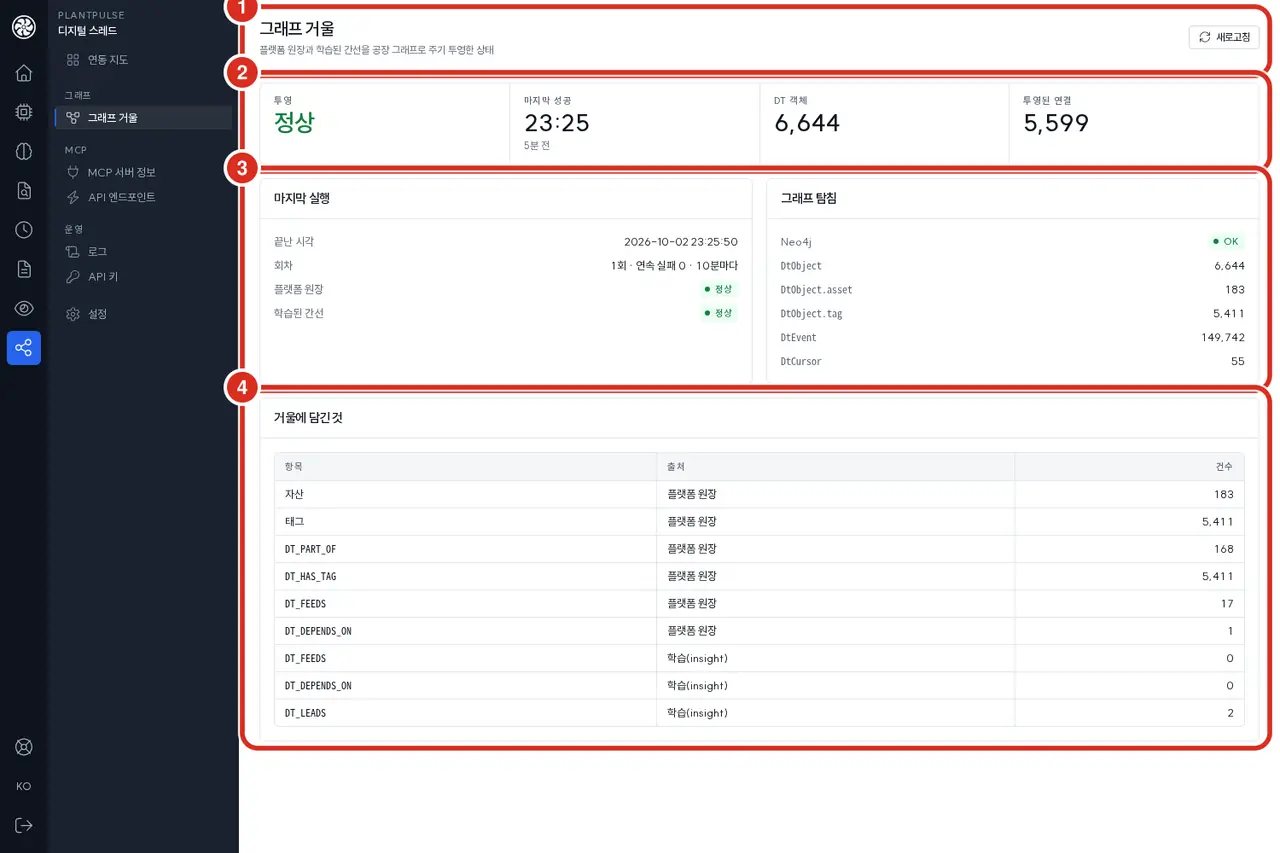
| No. | Location | What it does |
|---|---|---|
| ① | Screen header | Refresh. This screen is read-only |
| ② | Summary cards | The last projection's verdict (OK · partial · failed …) · last success time · object count in the mirror · number of projected connections |
| ③ | "Last run" · "Graph probe" | Left: end time, run count · consecutive failures · period, per-stage results (Platform master · learned edges). Right: whether the dedicated Neo4j is reachable and node counts per label |
| ④ | "What is in the mirror" | Per item (assets · tags · hierarchy · supply/dependency · precedence relations …), the source (Platform master · learning (insight)) and the count |
A periodic job inside the service carries the Platform master (sites · equipment hierarchy · tags · equipment relations) and the connections learned by time series insight into the mirror every 10 minutes. The first run is 1 minute after startup. Platform events are read in continuously and separately, and event references in the mirror are kept for 180 days.
| Verdict | Meaning | What to do |
|---|---|---|
| OK | Both master and learned edges were carried | — |
| Partial | The master was carried but learned edges were not (the previous edges remain) | If time series insight has just started, it resolves on the next run |
| Failed | The master could not be carried — the mirror is falling behind the master. The card on the admin console home drops to a yellow light | If "Operator action required" is shown, it is a configuration or credential problem → Logs |
Where it is used in the field and in chat
The Digital Thread is an optional integration for the copilot. The copilot has no dedicated Digital Thread screen, card, or menu (the old /thread screen, the «Today's work» card on the chat start screen, and the timeline on the equipment screen were removed in the new UI); when connected, three things are simply added.
| What is added | What |
|---|---|
| Tools Ask uses | The thread_ tools in Chat tools below |
| Tools automation can choose | The Digital Thread group in the tool list when creating automation, plus the templates that require this connection → Automation |
| Proposal evidence and drafts | Evidence in the proposal detail, and the draft created in the external system when approved (see "Safeguards" below) → Proposals |
- Digital Thread-only automation templates appear only when the tools exist. Of the fourteen templates in the gallery, PO delivery risk · quality anomaly tracing · drawing revision alert rely on
thread_tools, so if those tools are absent from this installation or unavailable to the person creating the automation, they do not appear in the gallery (they are not grayed out as «unavailable»). Attach the connectors and, with Chat tools below enabled, they appear in that person's gallery — drawing revision alert additionally requires enabling one of the version-status tools that are off by default (thread_part_revision_statusorthread_work_readiness) in addition tothread_today_work. Automations already saved open and run regardless of the gallery. - Proposal evidence opens in the right-hand panel. Clicking an evidence row in the proposal detail (document source · drawing · video) does not open a new tab; another panel is stacked on top of the detail, and clicking Back in the panel header returns to the detail you were viewing with the scroll position preserved. Drawing evidence moves on to Open in viewer (new tab) from the panel preview.
- The evidence panel of an Ask answer reads the source system once more. When you click a node in the link graph, the Digital Thread reads that one record now with the read tool of that kind's system-of-record connector and shows it as current values in the source system (not stored, 15 seconds per connector call), and History of this object shows the mirror's events 30 days at a time (retained 180 days). If that connector is absent or disabled, it simply shows «Unknown — connecting systems is optional»; it is not an error. Source system links are attached only when there are External links templates → Digital Thread — Answer evidence
In installations without the connection, these tools simply do not appear in the list; the copilot screens show no empty slots and no «not connected» notice. What field users can ask is described in Digital Thread — What You Gain When It Is Connected.
Equipment timeline — from Ask
For what happened to a piece of equipment, ask in Ask, for example "What happened to this equipment recently?", and thread_get_timeline returns the mirror's events in chronological order — equipment status and schedule, work orders, KPI confirmations, alarms, incidents, AI proposals and findings. What it is connected to is answered by thread_trace_links.
If it answers that the equipment is not yet in the Digital Thread, the mirror projection has not yet carried that equipment — check the last success time on the graph mirror screen above.
Foreman work readiness and readiness sources
Work readiness returns GO · AT_RISK · NO_GO · UNKNOWN for each operation due to start within one shift from now (12 hours by default, 48 hours maximum), ordered with blocked ones first. The decision is made by the Digital Thread; Ask and automation only relay the value. In Ask, readiness is carried on each row of thread_today_work (on by default), while thread_work_readiness, which asks for readiness alone, is off by default and must be enabled by an administrator.
Eight items are checked per operation — predecessor operations · materials · tools and calibration · personnel and qualifications · permits and isolation · quality holds · equipment maintenance · drawing version. Each item has a designated connector family it reads from (MES · SCM · tool management · ERP · safety · quality · maintenance · PLM), and that table is in AI Admin Console — Readiness sources.
- 🔴 Unknown is not GO. Items with no source connector or no answer are UNKNOWN and are not counted as passing.
- Without an MES connector, work orders are unknown, so no decision is made at all («No MES — no decision»).
- If source data is older than the freshness limit, the decision stops («Stale source — decision stopped»).
- The decision only reports — it does not dispatch work or reassign people.
The operator's job is to attach the sources. If the readiness answer is full of UNKNOWN, find items marked None (gray) or Stale in the Readiness sources view of the integration map and attach that family's connector or restore the source.
The readiness response (GET /api/v1/readiness, GET /api/v1/readiness/{작업지시}) additionally carries the following from 2026.10 re-release 3.
| Location | Field | Meaning |
|---|---|---|
| Per item | reason_code · reason_params | The reason as a machine-readable code and value. The copilot renders it as a sentence in the user's language (the English reason is the same code expanded) |
| Response header | purchase_orders | Only when ERP purchase orders were read — shortage lines created from ERP lines (derived_shortage_lines), values that disagree with SCM (conflicts), and the assumptions made at the time (assumptions). If not read, null |
| Response header | customer_orders_unknown_because | Why customer orders could not be read (ERP does not serve erp_list_sales_orders, and so on). If read, null |
| Per operation | customer_orders[] | The customer order line that work order fulfills — due date · slack days · risk · basis of the slack days (slack_basis) |
The drawing version item
Drawing version checks two things for the part numbers that operation uses.
- Engineering change — NO_GO if a released engineering change exists in PLM and only old-version parts remain. UNKNOWN if there is no PLM connector.
- Shop floor drawing — NO_GO if the version of the drawing indexed in RAG differs from the released version in PLM. This comparison is only made when the drawing reference described below is in the mirror. Without it, one check is simply skipped and the item value is unchanged.
Part number version status (current · superseded · change in progress · cannot verify) can also be asked separately — via the chat tool thread_part_revision_status, and the version labels in the drawing register use this. Cannot verify is not «current».
Today's work list — the foreman's day
The tool thread_today_work used by Ask and automation returns this list (in older versions the foreman's «Today's work» card on the chat start screen used the same list). Via the service API it is GET /api/v1/today?date=YYYY-MM-DD (the date is a day in the install time zone PP_TZ; blank means today).
- A row = an open operation planned for that day (MES) + an operation currently running on the Platform. Even if MES says «complete», it is carried if it is running on the Platform.
- Row fields — readiness (
readiness), the customer order it fulfills (customer_orders[], slack daysslack_days·risk), material POs being waited on (materials[]— expected arrival · days late), drawings to be used on the shop floor (drawings[]— version labelscurrent·outdated·change_open·unknown), Platform orders and equipment status (platform), and things to watch (attention[]). attentionvalues arereadiness_no_go(readiness NO_GO) ·material_late(material late) ·outdated_drawing_on_file(a superseded drawing is attached) ·drawing_change_open(engineering change in progress) ·customer_due_at_risk(customer delivery at risk) ·platform_running_outside_plan(an operation outside the MES plan is running).- Sorting — tightest slack days first, then NO_GO, superseded drawings, and planned start.
- 🔴 Fields that could not be read are
nullwith<칸>_unknown_because(the reason). An empty list means «read, and nothing there» — do not confuse the two. - Orders running on the Platform are joined to MES operations by the external identification pair (
external_system+external_id) on the Platform order list (/api/v5/order/query) row — only when the pair'sexternal_systemequals the MES connector name (e.g.demo-mesfor the demo MES,PLANTPULSE-SIMfor the simulator);external_idis then the MES operation id. The order detail is not called separately. An order whose pair is empty or names another system is not attached to any operation. - Platform orders and equipment status are read only for today (for other dates,
platform: null). If the Platform API address or token (DT_PLATFORM_API_URL·DT_PLATFORM_API_TOKEN) is blank, the reason is carried inplatform_unknown_because. - Errors — an invalid date format returns 400 "date must be YYYY-MM-DD: …"; failure to reach the registry or a connector returns 503
{종류}: {상세}.
The chat tool thread_today_work returns the same list trimmed to within 16,000 characters, and the copilot appends «Today's work» and «Affected customer POs» tables at the end of the answer → Digital Thread — What You Gain When It Is Connected
Drawing references — what RAG carries
When RAG's drawing indexing (DRAWING_INGEST_ENABLED, off by default at shipment) is enabled, RAG sends the drawing number · version · part number · parts list part numbers · characteristic IDs read from the title block to the Digital Thread each time it indexes a drawing. Only the connection «this drawing version describes this part number» is created in the mirror; values such as dimensions and materials are not carried. When a new version arrives, the previous version's connections are closed.
On receipt, the Digital Thread compares against PLM's BOM and engineering changes and reports parts list mismatches · versions lagging the engineering change · versions differing from the engineering change. How to enable it is in Environment Configuration, and the screen for viewing drawings is in AI Admin Console — Drawing register.
Chat tools
| Tool | Default | What it does |
|---|---|---|
thread_get_timeline | On | What happened to a single object, in chronological order |
thread_trace_links | On | What an object is connected to and how, and the path between two objects |
thread_today_work | On | The foreman's today work list — readiness per operation · customer order slack days · material POs being waited on · drawing versions to use (above) |
thread_impact_range | On | How far a late PO · supplier · equipment · defective lot reaches — work orders · customer orders · customers (forward = delay, backward = quality trace), and the links as of a past point in time (as_of) |
thread_interval_production | On | The work orders · lots · serial numbers run on that equipment during an equipment anomaly · stop interval, and the customers those lots reach (up to 31 days) |
thread_explain_recovery | On | How far the schedule slips when a part is late, and the recovery plan (what-if). See below |
thread_work_readiness | On | Foreman work readiness — GO · AT_RISK · NO_GO · UNKNOWN per operation with per-item reasons |
thread_part_revision_status | On | Whether a part number and version is usable right now (compared against the PLM released version and engineering changes) |
thread_check_tooling | On | From the tool management connector — measurements taken with overdue or failed gauges, tools used on a work order, and worn tools that are candidate causes of a nonconformance |
The MCP Gateway registers this server as a built-in server and brings all nine in enabled when first discovered (2026.10 re-release (2026-10-20) — before that the copilot enabled only four). Values an administrator has changed once are not overwritten, and new tools added to the Digital Thread come in disabled. The place to turn them on and off is AI Admin Console › MCP Gateway › Tools → MCP Gateway · MCP Tool Map
today_work · work_readiness · part_revision_status · check_tooling appear in the list only when the connector registry is configured, and explain_recovery only when there is somewhere to read the recovery inputs from. Values enabled or disabled here apply to Ask and automation alike — a disabled tool cannot be used by either. There is nowhere in the copilot UI that calls the Digital Thread directly.
The figures from thread_explain_recovery are produced by the Digital Thread's optimization solver, and the model only relays them.
What the answer contains grows with the connectors that are enabled.
| Connector enabled | What is added to the answer |
|---|---|
| PLM · QM | For each engineering change or nonconformance, the work it blocked and the added delay it contributed to the milestone. If times, processing, or effectivity are unknown and no figure can be produced, it states that reason instead of a figure |
SCM (mes-mcp/0.5 supply capacity) | For each late part, whether it can be pulled in given supplier capacity and the resulting milestone delay. If capacity is unknown, it reports «impact only» and produces no recovery figure |
ERP erp-mcp/0.2 · MES mes-mcp/0.6 (manufacturing BOM) | Narrows what an engineering change or nonconformance blocks from the whole work order to the operation consuming that part number |
| Scheduling (APS) | Uses the published plan's operation schedule as the basis of the recovery calculation |
| Maintenance (CMMS) · Safety (EHS) | Carries preventive maintenance windows, breakdown repairs that stopped equipment, and isolations as equipment constraints |
| Tool management · Warehouse (WMS) | Tool readiness for in-scope work orders, and inventory for late parts (available · on hand · reserved · under inspection) |
ERP erp-mcp/0.3 (purchase orders · customer orders) | Counts late materials from ERP purchase orders even without SCM. The customer order lines the impact reaches (customer_orders[] — due date · slack days · risk) and PO values where ERP and SCM disagree (purchase_order_conflicts[]) are carried. If customer orders cannot be read, the reason is carried in customer_orders_unknown_because |
Missing connectors are listed in the «What was not considered» part of the answer — the model must state these as «unknown».
This tool is on by default at shipment. When the recovery plan proposes an expedite «draft», an action card («Available actions») is attached below the Ask answer (see "Safeguards" below). To suppress the card, disable this tool in AI Admin Console › MCP Gateway › Tools → MCP Gateway
Safeguards
The Digital Thread reaches external systems, but there is no path to control equipment or write confirmed records.
| Safeguard | Details |
|---|---|
| Read tools | Called at query time, and returned values are not stored. All thread_ chat tools are read-only as well |
| Action tools (🔒) | Tools that create drafts and requests in external systems. They are never called without human approval — the service rejects the call if the approver, approval time, reason, proposal ID, or idempotency key is missing |
| Admin console | Does not call action tools (requests return 403) |
| Copilot proposal detail | Approve and create draft — requires the permission «Approve — proposal card drafts» (administrators only in the default set) and a reason is mandatory. It is possible only when there is an enabled connector serving that action. The result is recorded on the card as "Draft created", and confirmation is done by a human in that system |
| Chat action cards (2026.10) | Attached when a thread_explain_recovery answer proposes an expedite draft, or when a insight_list_findings answer contains an open breakdown risk finding. Approve and execute requires a reason, and who may approve is set by work role — SCM expedite drafts by the plant manager, MES maintenance request drafts by the foreman · maintenance · plant manager, and administrators always. The person who asked cannot approve their own card (two-person approval). Maintenance request drafts in the proposal detail are approved by administrators only (per the default set). The maintenance request card appears only when the MES connector serves mes_create_maintenance_request. Cards are visible only to the owner of the conversation |
| Repeating the same request | If the same idempotency key arrives again, the connector is not called again and the originally created draft is returned |
External system connectors are registered only here, on the integration map. The copilot's old Tool Servers (MCP) screen was removed in 2026.10 re-release (2026-10-20), and the old registrations left there
are deleted in that release. Even if you attach one to the MCP Gateway as an external server, its connector tools (mes_ · erp_ …) cannot be enabled.
If you had connectors registered in the copilot in an older release, note down their endpoints and header names, register them again here, and re-enter the auth values →
MCP Tool Map
If something goes wrong
| Symptom | Cause and what to do |
|---|---|
| The integration map shows "Connector registry unavailable: 503 … config_error" | The registry store (PG) or the encryption key (PI_DT_SECRET_KEY) is empty. The mirror screen works regardless |
| "Enable" does not work | The conformance test was not run or failed, or the endpoint, credentials, or tools changed afterwards — run the test again |
| Auth error during registration | The connector token or header name is wrong |
| Error saying stored credentials cannot be decrypted | The key that sealed that value is not in the current or previous key (PI_DT_SECRET_KEY_PREVIOUS). Put the old key in the previous-key slot and restart, or re-enter the credentials |
| The graph mirror verdict is "Failed" | Check the per-stage results and the service log — bin/logs.sh plantpulse-digital-thread-api |
| Synced, but the equipment is reported as absent from the mirror | The equipment ID the connector mapped to does not exist in the Platform master. Check whether the projection ran and whether the connector's equipment mapping table is correct |
| Changed a field binding but the mirror is unchanged | It is before the next periodic sync — click Sync now in the side panel. Installations with DT_CONNECTOR_SYNC_ENABLED=false sync only this way |
| A connection that disappeared from the source stays «open» in the mirror | The list was truncated during the sync, so closing was skipped (the yellow row "collection was truncated", and prune_skipped in the response) — it is closed on a sync that reads to the end. If it keeps getting truncated, check the connector's paging and limits |
| The ERP connector was disabled after raising the ERP version | A change in the declared version disables it at tool discovery — run the conformance test and enable again |
| Customer orders in today's work or the recovery plan are «unknown» | The ERP connector does not serve erp_list_sales_orders of erp-mcp/0.3, or it is disabled. The reason is in customer_orders_unknown_because |
| Not sure whether the connector's periodic sync is running | connector_sync in the Digital Thread's /health — the last result per connector and the failing list |
The recovery plan or readiness stops with "stale source" (stale_inputs) | Some connector's data is older than the freshness limit. Find it by the Stale label in the Readiness sources view and check whether the source behind that connector has stopped |
The recovery plan says "Not found in MES" (unresolved_ids) | The number referenced by PLM or QM exists in MES under a different number — declare an identity |
| The readiness answer is full of UNKNOWN | Source connectors are not attached — attach the families of items marked None in the Readiness sources view |
| Chat action cards do not appear | An administrator disabled thread_explain_recovery, the answer lacks the draft material (purchase lines, required date), or there is no enabled connector serving that action |
Related documents
- AI Admin Console — the Digital Thread rail and common menus (logs · API keys · settings)
- Copilot Admin Console — enabling and disabling chat tools
- Digital Thread — What You Gain When It Is Connected — how field users ask in Ask
- Digital Thread Connectors — per-family tools · where they are used · minimum versions
- MCP Tool Map —
thread_tools - Environment Configuration — drawing indexing switch (
DRAWING_INGEST_ENABLED), connector sync · freshness limits (DT_CONNECTOR_*·DT_LINK_HISTORY_DAYS) - User Permissions and Work Roles — who may approve action cards
- Database Administration — the two Neo4j instances and
pi.dt