High Availability (HA) Configuration
A configuration that attaches two Edge devices to the same PLC so that data collection continues even if one of them fails.
The screen is under the HA PAIR menu on the left (/ui/ha).
What is made redundant — two readers, one writer
| How | |
|---|---|
| Reading (collection) | Both Edge devices read the same PLC independently. They don't pass through each other |
| Writing (control) | Only one does it. The value that determines which one is edge.plc.write_authority |
Overlapping reads are harmless, but writes are different. If both Edge devices have write permission at the same time, the same command goes to the PLC twice (split-brain). The entire purpose of this structure is to prevent that.
The default value for edge.plc.write_authority is true — if there is no configuration, that box is the sole
write authority, so a site with only one Edge device works as-is without any setup.
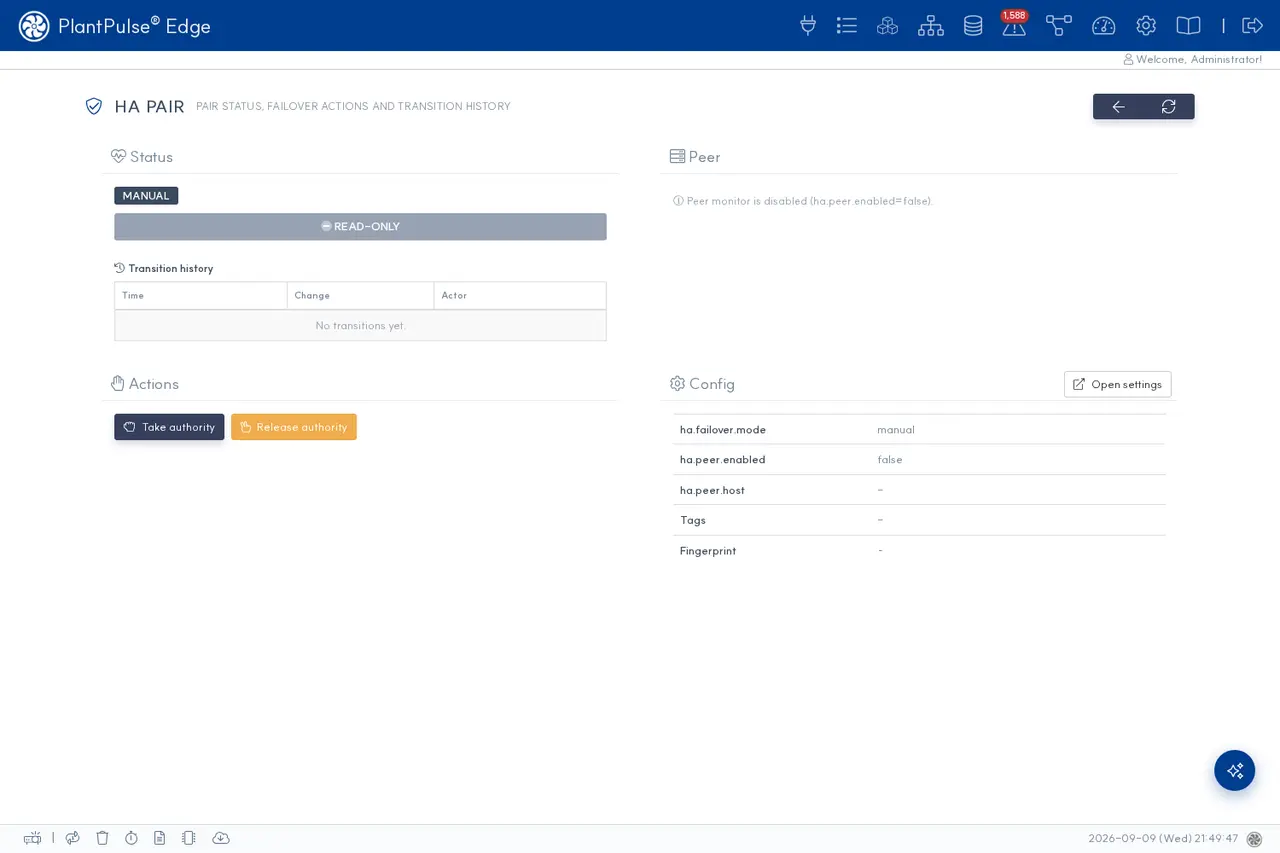
How to read the screen
| Element | What |
|---|---|
| Mode badge | MANUAL / AUTO — ha.failover.mode |
| Permission bar | Whether this Edge is currently the write owner. If READ-ONLY, it isn't |
| Switch history | When · what changed · who did it |
| Actions | Varies by mode (below) |
| Peer | Status of the opposite Edge. If ha.peer.enabled=false, it is empty |
| Configuration | ha.failover.mode · ha.peer.enabled · ha.peer.host · tags · fingerprint |
Tag Fingerprint
Compares whether the two Edge devices have the same tag definitions using a single value. If they differ, the screen
notifies you with TAG DRIFT — this means a tag was added to one side but the other was forgotten,
and if a failover happens, the side that takes over will not collect some tags.
The two modes
manual — the operator switches manually (default)
- Actions:
Take authority(take) ·Release authority(put down) - The peer monitor watches the opposite Edge but does not switch on its own.
The peer monitor (HaPeerMonitor) polls the opposite Edge's GET /api/v1/ha/status every 10 seconds
(first poll 15 seconds after startup), displays the status, and writes warning logs.
It never changes any configuration under any circumstances.
If a brief network interruption is misjudged as "peer is down" and the Edge promotes itself, both sides end up writing
simultaneously. That's why manual only does monitoring and warning, and promotion is done by a human.
Automatic promotion is done by auto mode, which decides from the PLC heartbeat rather than the network between the Edges (below).
auto — automatic promotion via the PLC heartbeat
When it is active: when ha.failover.mode=auto and both ha.failover.heartbeat_opc and
ha.failover.heartbeat_address are set. If either is empty, the Edge logs the warning below and
makes no automatic changes (it behaves like manual).
HA auto-failover degraded to manual — ha.failover.heartbeat_opc/address not set.
Decision rules
| Situation | What happens |
|---|---|
| Write owner (WRITER) | Every heartbeat_interval_ms, writes a value carrying its own writer_id to the PLC heartbeat address |
The heartbeat value seen by the standby (STANDBY) does not change for takeover_timeout_ms | It promotes itself to WRITER |
| The heartbeat read itself fails | Not counted as "frozen" — what cannot be observed is not dead, so it does not promote |
| Another WRITER's heartbeat is alive | Does not promote |
| Both claim WRITER at the same time | The lower writer_id wins and the higher one steps down |
| The WRITER keeps failing to write the heartbeat | After max(3, ceil(timeout ÷ interval)) consecutive failures it steps down to STANDBY on its own — with the defaults, ceil(2000 ÷ 500) = 4 times |
| Boot | Always starts as STANDBY, regardless of configuration. If no WRITER is writing the heartbeat, it promotes after takeover_timeout_ms — an Edge left on its own also becomes WRITER by itself |
| The side that was down comes back | It does not take authority back automatically (no automatic failback) |
- Actions:
Force writer·Force standby·Clear override— manual overrides placed on top of the automatic decision above. Releasing withClear overridereturns to the automatic decision (the API isPUT /api/v1/ha/failover/override).
Force writer means double writesA manual override bypasses the automatic decision. If you force both Edges to WRITER, nothing stops it — overrides are the operator's responsibility.
The takeover_timeout_ms default of 2000 comes from the assumption "the PLC is directly attached, so reads
are usually under 100 ms → the normal observation interval is about 600 ms."
- On sites where reads are slow, for example through a gateway, raise
takeover_timeout_ms. - If you need faster detection, reduce
heartbeat_interval_msfirst, not the timeout. The timeout cannot go below 2000 (a lower value is raised to 2000). - If you set it too short, a brief dual-writer window can occur. It converges on the lower
writer_idat the next observation.
Peer status detection
| Status | Meaning | What to do |
|---|---|---|
OK | Normal — only one side has write permission | — |
DOWN | Cannot reach peer | Check whether the peer is really dead; if it is, do Take authority on this side |
DUAL_AUTHORITY | Both sides have write permission | Immediately do Release authority on one side |
NO_AUTHORITY | No one has write permission | Do Take authority on one side — no control is issued until then |
+TAG_DRIFT | Tag definitions differ between the two | Align the tags and confirm that the fingerprints match |
Configuration
Put it in /etc/kopens/app.properties (= app.properties symlink) and restart →
app.properties reference
| Key | Meaning | Default |
|---|---|---|
edge.plc.write_authority | Whether this Edge is the write owner | true |
ha.failover.mode | manual / auto | manual |
ha.peer.enabled | Enables the peer monitor | false |
ha.peer.host | Address of the opposite Edge | — |
ha.failover.heartbeat_opc | Connection (OPC) id used to write and read the heartbeat — required for auto | — |
ha.failover.heartbeat_address | Heartbeat address on the PLC — required for auto | — |
ha.failover.heartbeat_address2 | Optional mirror register. Leave empty to not use it | (empty) |
ha.failover.heartbeat_data_type | Data type of the heartbeat address | DWord |
ha.failover.heartbeat_interval_ms | Heartbeat write and observation interval (minimum 250) | 500 |
ha.failover.takeover_timeout_ms | Promote if the heartbeat doesn't change for this long (minimum 2000 — lower values are raised to 2000) | 2000 |
ha.failover.writer_id | This Edge's heartbeat id. Set it differently on the two Edges — on a simultaneous claim the lower one wins | 1 |
Instead of the two Edges checking each other directly, auto mode judges liveness by the write owner writing a
heartbeat to a single address on the PLC. Even if the network between the Edges is down, the PLC sees both
sides, so it distinguishes between "can't see each other" and "truly dead."
API
Used when handling this from a program.
| Path | What |
|---|---|
GET /api/v1/ha/status | Current status — the same thing the peer monitor polls |
PUT /api/v1/ha/write-authority | Take · put down write permission |
PUT /api/v1/ha/failover/override | Force assign · release — only in auto mode (otherwise 409 NOT_AUTO_MODE) |
POST /api/v1/ha/definitions | Replicate tag definitions to the peer |
Request and response formats are in the "High Availability (HA)" section of the REST API.
When deploying in the field
- Connect the two Edge devices to different switches. If they're on the same switch, that switch becomes a single point of failure, rendering the redundancy meaningless.
- Put the same tag definitions on both Edge devices and confirm that the fingerprints match.
- Set
edge.plc.write_authority=trueon only one of them. - Use
ha.peer.enabled=trueandha.peer.hostso each can see the other. If you'll useauto, give both Edges the sameheartbeat_opc·heartbeat_addressand differentwriter_idvalues. - If you'll use it together with platform-side redundancy, see → Platform High Availability (HA)
Redundancy is for data availability. The safety status of the equipment is independently guaranteed by the PLC / Safety PLC (SIS) under any software failure. The Edge or the platform is not the entity that ensures safety.
See also
Platform High Availability (HA) · app.properties reference · Diagnostics and Inspection